

Finding one interesting competitor ad is easy. The difficult part is learning whether its composition, message, offer, or format is part of a repeatable pattern—or simply an isolated example. Similar-ad research solves that problem by treating one creative as a starting point rather than a conclusion.
Instead of trying to guess the exact keyword, advertiser name, or product label behind a visual, you can begin with the visual itself. A reference image, video, screenshot, or description becomes the query. The resulting group of related ads gives you more material to compare and reduces the temptation to overlearn from a single polished example.
The practical principle
- Use visual search to expand a known reference.
- Use semantic search when the idea is clear but the reference asset is missing.
- Use filters to make the result set comparable.
- Look for recurring structures across several ads.
- Translate the pattern into an original hypothesis—not a copy.
What Does “Similar Ads” Actually Mean?
Similarity is not one thing. Two ads may look alike but sell different products. They may promote the same product while using completely different messages. Or they may share the same opening hook and call to action even though the visual styles are unrelated.
- Visual composition: Layout, color, framing, objects, scene, or camera angle.
- Product similarity: Comparable products, use cases, categories, or demonstrations.
- Message structure: Hook, problem, promise, proof, offer, and CTA sequence.
- Creative format: UGC, demo, testimonial, comparison, carousel, or gameplay.
- Delivery context: Network, market, language, date range, and observed duration.
A useful workflow therefore does more than retrieve visually close thumbnails. It asks which dimensions are actually relevant to the research question. If you are studying a product demonstration, visual and product similarity matter. If you are investigating a pain-point hook, the script structure may matter more than the product shown on screen.
Confirmed BigSpy capability: the BigSpy Ad Library currently provides Ad Info Search, Feature Search, and Visual Search. Visual Search accepts an uploaded image or video, or an image/video URL. For Feature Search, switch the same search box to the Feature Search tab and enter a keyword or short phrase describing the image or video content you want to find. Similarity sorting is available for these search modes.
Two Ways to Start a Similar-Ad Search in BigSpy
BigSpy already provides similar-ad search inside the Ad Library. You can begin with a file or media link when the reference comes from outside BigSpy, or use an existing result card when you discover the reference while browsing ads.
1. Open Visual Search and provide a reference
Select Visual Search in the Ad Library. Paste an image or video URL into the search field, or choose Local Upload to drag in a file. The current interface accepts images up to 3MB and videos up to 10MB. Local-file search and URL search are alternative inputs, so use one at a time.
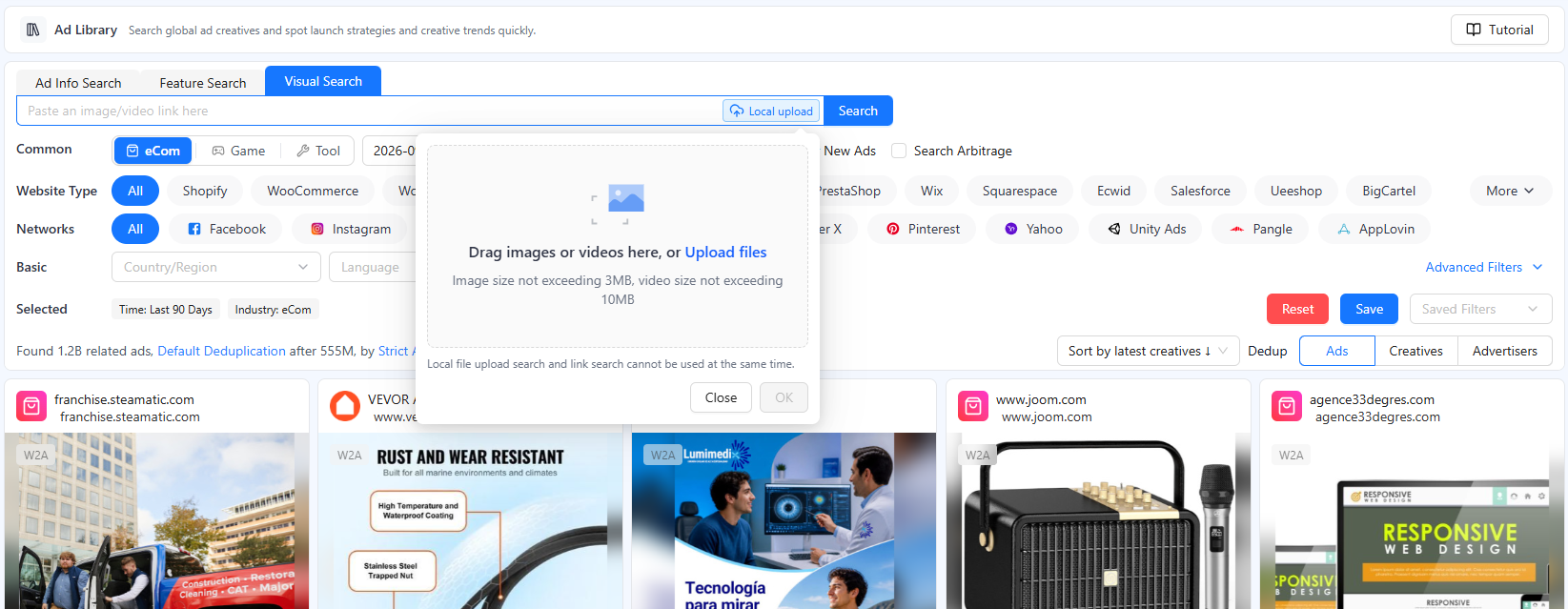
2. Start directly from an ad card
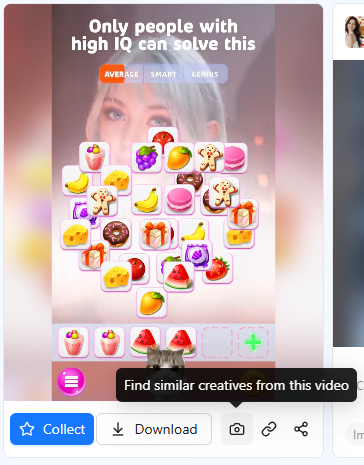
When a useful creative appears in the result grid, use the camera action on the ad card. Its interface label explains that BigSpy will search for similar materials based on the current video. This route preserves the creative you were already studying as the seed, so you do not need to download it and upload it again.
This is the faster path for exploration: find one relevant ad, expand it into a similar set, then compare formats, hooks, demonstrations, offers, and calls to action across the returned results.
Choose the Search Mode That Matches Your Starting Point
The best search mode depends on what you already know. Do not force a keyword query when the important information is visual, and do not upload a random screenshot when the real question concerns an advertiser or phrase.
Visual Search
Use an image, video, screenshot, or media URL when you want related compositions, products, assets, or video styles.
Feature Search
Switch the search box to Feature Search, then enter a visual-content keyword or short description—for example, “Santa hat”—to find creatives whose image or video contains that element. No upload is required.
Ad Info Search
Use keywords, advertiser details, app names, or product terms when the text or business identity is the strongest clue.
A Five-Step Workflow for Finding Similar Ads
1. Define the research question
Decide what you want to learn before searching. Examples include how competitors demonstrate a product, which opening structures recur in a category, or how the same visual idea changes across markets. A clear question prevents the result grid from becoming another source of endless inspiration browsing.
2. Choose a clean seed creative
Upload the original image or video when possible. If you only have a screenshot, crop away browser controls, chat overlays, and unrelated page content. Keep the product, layout, or scene that matters to the search. A noisy reference can make the search follow the wrong visual features.
3. Build a comparable result set
After running Visual Search or Feature Search, sort by Similarity and then narrow the results with the context that matters: industry, network, country or region, language, creative format, time range, and material specifications. Keep the filters broad enough to reveal patterns, but narrow enough that the ads answer the same question.
4. Compare a cluster, not a single ad
Review a practical sample of related creatives and record what repeats. Separate visual resemblance from strategic resemblance: two ads may share a blue product shot while using different audiences, proof devices, and offers. Repetition across several advertisers or versions is more useful as a research signal than one attractive card.
5. Save the evidence and write a testable hypothesis
Save the most relevant references with a short note explaining why each one matters. Then convert the pattern into a hypothesis for your own product. For example: “A problem-first opening followed by an immediate close-up demonstration may make the benefit easier to understand in the first five seconds.” That is a testable idea—not a claim that the competitor’s ad is profitable.
What to Compare Across Similar Ads
Use the same observation fields for every ad in the set. Consistency makes patterns easier to spot and keeps the analysis from drifting toward whichever creative happens to look the most polished.
| Element | Question to ask | Useful evidence | Do not assume |
|---|---|---|---|
| Hook | What earns attention first? | Opening line, first frame, movement, surprise, or pain point. | That a strong-looking hook produced a high hook rate. |
| Audience | Who is the message explicitly for? | Spoken wording, use case, setting, and stated problem. | Age, income, health, or identity based only on appearance. |
| Demonstration | How is the product or benefit made visible? | Before/after sequence, close-up, steps, comparison, or result. | That the shown result is independently verified. |
| Proof | What is offered as a reason to believe? | Testimonial, review, process, expert claim, packaging, or demo. | That every claim in the creative is accurate or compliant. |
| Offer | What changes the purchase decision now? | Discount, bundle, trial, scarcity language, or guarantee claim. | That the offer is available in every market or still active. |
| CTA | What action does the advertiser request? | Button text, spoken instruction, end card, or landing-page promise. | That the visible CTA produced a strong conversion rate. |
| Observed timing | When and for how long was the ad recorded? | First seen, last seen, and running-days fields where available. | That duration alone proves spend, revenue, or profitability. |
Use deduplication deliberately
If the results contain many copies of the same asset, creative-level deduplication can reveal a wider variety of visual ideas. If you want to compare how different advertisers approach the category, advertiser-level deduplication can reduce the influence of one prolific brand. If versioning itself is the research question, keep the repeated variants and compare what changed.
Separate discovery signals from performance data
Public or third-party ad research can show creative content, observed dates, engagement fields, estimated impressions, or platform-specific signals where available. Exact spend, conversions, CPA, and ROAS normally belong to the advertiser’s private account. Use public signals to choose what deserves closer study; use your own campaign results to decide what actually performs for your brand.
Turn Similar Ads into an Original Creative Brief
The goal is not to reproduce the closest visual match. It is to understand which creative choices recur, decide which choices may be relevant to your audience, and create an original test with its own product evidence and brand voice.
Keep the principle
Retain the general structure, such as problem → demonstration → proof → CTA.
Replace the substance
Use your own product, claims, customer context, evidence, offer, and visual identity.
Define the test
State which variable changes, what stays constant, and which first-party metric will judge it.
A simple brief template
- Audience problem: the specific situation the ad will address.
- Hook hypothesis: the opening device you want to test and why.
- Core message: one benefit expressed in the brand’s own language.
- Evidence: approved demonstration, product fact, or customer proof.
- Visual direction: format, framing, setting, pace, and required assets.
- Offer and CTA: the real commercial terms and next action.
- Success metric: the first-party result used to accept or reject the idea.
What Similar-Ad Research Cannot Prove
Similarity is a retrieval signal. It tells you that creatives share detectable visual or semantic characteristics. It does not tell you why an advertiser produced the asset, what audience received it, how much was spent, or whether the campaign was profitable.
Keep these boundaries visible in every report:
- A similar image does not guarantee the same product, advertiser, or source.
- An observed ad is not proof that the creative is still active everywhere.
- Longer observed duration can justify further study, but it is not proof of profitability.
- Engagement and estimated-impression fields are not substitutes for conversions or ROAS.
- Repeated patterns can inspire hypotheses, but your own tests must validate them.
The most reliable outcome of competitor research is therefore not “this ad wins.” It is a narrower statement: “this pattern appears often enough, in a comparable enough context, to deserve an original test.”
Frequently Asked Questions
How can I find ads similar to an image?
BigSpy provides two existing entry points. Open Visual Search to upload an image or paste an image URL, or use the camera action on an ad card to search from the current creative. Then sort or refine the similar results with filters such as industry, network, country or region, format, and date range.
Can I use a screenshot to search for similar ads?
Yes. A screenshot can be used as the visual query. Crop away browser controls, captions, chat overlays, and unrelated page elements when possible so the important product, layout, or scene occupies most of the image.
Can I find ads without uploading an image or video?
Yes. Switch the search box to Feature Search and enter a keyword or short phrase that describes the image or video content you want to find. For example, enter “Santa hat” to search for creatives whose image or video contains a Santa hat. Use Visual Search instead when you want to search from an uploaded file or media URL.
Does a similar ad result mean the advertiser copied the original?
No. Visual similarity can come from common product photography, templates, category conventions, stock assets, or independent creative choices. Treat it as a research lead, not proof of copying, ownership, or chronology.
How should I use competitor ads without copying them?
Extract general patterns such as hook type, message order, demonstration style, proof device, offer structure, or CTA. Rebuild the idea with your own product facts, audience, evidence, brand voice, visuals, and compliance review, then test it with first-party performance data.
Start with one creative. Build a better research set.
Use BigSpy Visual Search or Feature Search to expand a reference, compare related ads, and turn recurring creative patterns into original test ideas.