Read ad copy alongside its visuals
Read the timed transcript and jump to the corresponding video moment to see how the words and visuals work together.
For your work: review wording alongside the relevant scene.VIDEO ANALYSIS · ECOMMERCE AD INTELLIGENCE
Understand the hook, message, proof, and scenes behind a video ad. Explore a real breakdown and turn findings into practical references for your creative work.
Why analyze your video ads?
Review the message, structure, selling points, and scenes to build clear references for creative research and collaboration.
Read the timed transcript and jump to the corresponding video moment to see how the words and visuals work together.
For your work: review wording alongside the relevant scene.See how the ad connects its opening, user problem, product introduction, supporting claims, and offer.
For your work: organize a clear sequence for your own content.Study how contrast, demonstrations, or questions introduce the ad, then assess which approach suits your product and audience.
For your work: develop opening ideas suited to your product.Review the specifications, demonstrations, and brand statements used to explain the product’s value.
For your work: identify demonstrations or information your own ad needs.Use the shot breakdown to review each segment’s visuals, key details, and possible role in the ad.
For your work: share specific references for filming and editing.Copy findings or export the report and shot table to keep the source, analysis, and useful ideas together.
For your work: revisit references for testing, comparison, and collaboration.How to use the video ad analyzer
Open a video creative, run Video Analysis, then return to your report in Ecommerce Ad Research.
Ad Library → Creative Details
AI Tools → Video Analysis
Ad Research → Ecommerce Ad Research → Video Analysis
Explore a real analysis
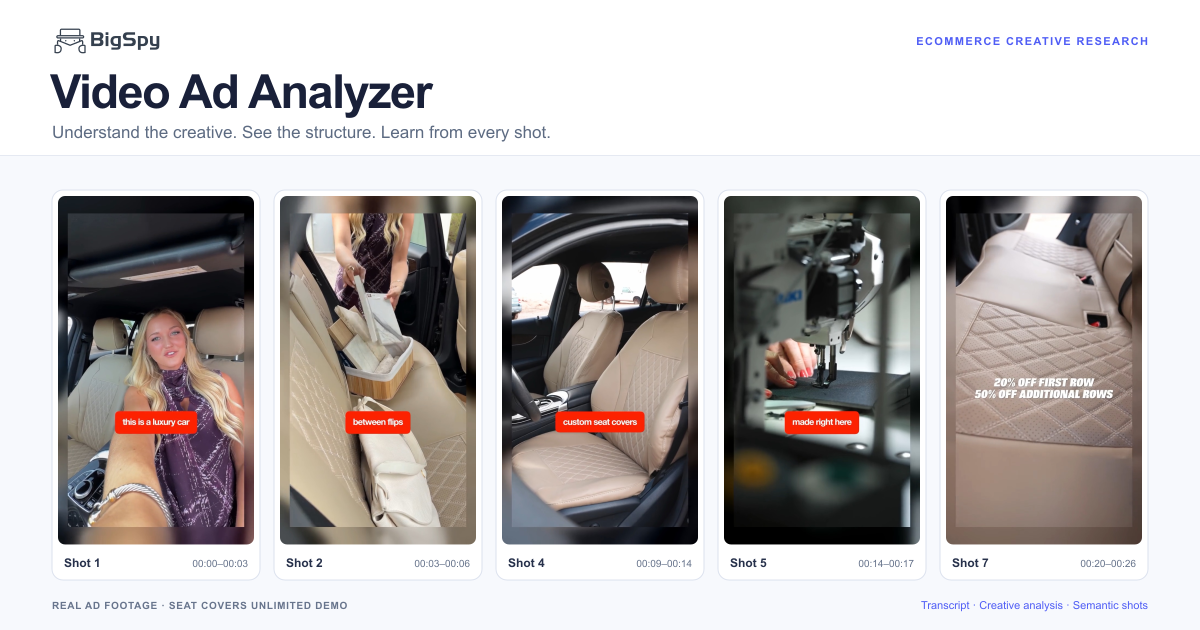
Explore a report generated by BigSpy for a custom seat-cover ad. Play the video, jump from a finding to its source moment, and inspect all seven semantic shots.
Problem scenario → Product introduction → Core selling points → Trust signals → Emotional appeal → Promotion
Luxury-car imagery is paired with an everyday, messy use case.
Source evidence: The supplied report pairs the opening car interior with “This is a luxury car” and “hauling drywall dust.”
A car used for both everyday travel and carrying work materials.
Source evidence: Visible captions state “hauling drywall dust,” “five days a week,” and “between flips and client meetings.”
The creative frames dirt, wear, and spilled coffee as reasons to protect the seats.
Source evidence: The report cites visible stains, wiping actions, “taking a beating,” and “spilled latte.”
The sequence moves from mess to a fitted-cover demonstration, manufacturing footage, and a discount.
Source evidence: Shots 4–5 show the fitted covers and production scenes; the closing segment displays percentage discounts.
The ad claims the covers are cut for the vehicle’s specific year and model.
Source evidence: Visible speech captions read “custom seat covers” at 00:10.6–00:11.6 and “cut to my exact … year and model” at 00:12.9–00:14.9. Fit remains an advertiser claim.
The ad presents “40+ years” and US manufacturing as trust signals.
Source evidence: Factory footage accompanies captions reading “40+ years in the business” and “made right here … in America” at 00:14.9–00:17.9. These claims belong to the ad.
The message may appeal to drivers who want to protect an interior while using their car for varied tasks.
Source evidence: This interpretation comes from the stated luxury-car use case and the mess scenarios; it is not measured audience targeting.
The video displays 20% off the first row and 50% off additional rows.
Source evidence: On-screen copy in the supplied report: “20% OFF FIRST ROW 50% OFF ADDITIONAL ROWS.” Current availability is not established.
| Shot | |||||||
|---|---|---|---|---|---|---|---|
| Video clip | |||||||
| Time range | |||||||
| Visual description | A woman speaks to the camera inside a Mercedes-Benz with beige seats. The report records captions about a luxury car and hauling drywall dust. | The speaker continues “five days a week” until about 00:04.0, then the video shows items being placed on the rear seat with captions about flips and client meetings. | The video shows an item on the seat, wiping with a blue cloth, the speaker, and a Mercedes-Benz sill. Captions move from “taking a beating” to “Mercedes interior.” | The “over a spilled latte” caption continues until about 00:10.6. Installed seat covers and a brand logo then appear, followed by “cut to my exact” at 00:12.9. | The segment begins with “year and model” and installed-cover detail, then moves to manufacturing footage and the “40+ years” / “made right here” captions. | Manufacturing footage and “in America” continue until about 00:17.9. The speaker returns with “If your car works as hard as you do,” followed by “protect it.” | “Protect it” continues until about 00:20.2, followed by seat-cover details. The two discount statements are fully readable at about 00:20.7–00:23.8; the brand-logo close follows. |
| Visual highlights | The interior and the messy-work reference create a contrast. | Items placed on the rear seat make the mixed work-and-daily-life use case tangible. | Seat use and a wiping action establish the protection theme before the coffee-spill caption. | Close-ups support the ad’s custom-fit positioning and styling message. | Production footage accompanies the advertiser’s experience and origin claims. | Direct-to-camera delivery returns attention to the presenter. | The closing sequence gives visual prominence to the discount and brand. |
| Possible creative role | The contrast may prompt curiosity and make the use case feel recognizable. | A familiar cleaning problem prepares the viewer for a protection product. | The scene may increase the relevance of protecting a valued interior; permanent damage is not established. | Showing the installed product may address concerns about appearance and fit. | These brand signals may support trust; the report does not independently verify them. | The caption connects the car’s work use with a protection message. | The promotion provides an incentive to consider the offer; actual conversion impact is unknown. |
| Interactive elements | Not identified in the supplied report. | Not identified in the supplied report. | Not identified in the supplied report. | Not identified in the supplied report. | Not identified in the supplied report. | Not identified in the supplied report. | Not identified in the supplied report. |
Caption display times were checked at 0.1-second intervals. Report windows describe the analysis segments; actual encoded clips have short end overlaps. The source lasts 26.71 seconds; the last exported clip ends at approximately 26.24 seconds, leaving about 0.47 seconds of the logo tail in the full source only.
Put the analysis to work
Every report follows the same preset analysis framework: a timed transcript, structure formula, hook, primary scenario, pain points, content strategy, product selling points, audience focus, promotional offer, and semantic-shot breakdown. Use these consistent dimensions for the four activities below.
The framework stays consistent; findings vary with the video. An element that is absent or not identifiable should not be treated as a confirmed finding.
Use the analysis to identify a creative element worth testing in your own ad. Start with a question about the message or presentation—not a claim that the report has found a performance problem.
Take away: a focused test plan explaining what to change, why to try it, and what stays unchanged.
The consistent report structure gives you a common comparison framework. Place findings from separate reports in your own comparison table, rather than relying on an overall impression of each video.
Take away: a comparison of shared approaches, differences, and angles not yet seen in your selected ads. A common approach is not necessarily an effective one.
Select the report fields most relevant to each collaborator. Explain what is worth studying instead of sending a video link with only “make something like this.”
Take away: a reference explaining where to look, what to learn, and what needs adapting—not copied claims, scripts, or footage.
Use the report’s consistent fields as headings in your existing research notes or team spreadsheet. Keep the reason for saving an ad alongside its source, rather than storing only the video.
Take away: a reusable creative record organized by the idea you want to revisit, not just an advertiser’s name.
Video ad analyzer FAQ
A video ad analyzer reviews the visual, spoken, and structural elements inside an advertisement. BigSpy organizes those elements into a timed transcript, ecommerce creative findings, and semantic-shot evidence.
The report organizes a timed transcript, creative structure, opening hook, usage scenarios, pain points, product claims, audience signals, promotions, and semantic-shot analysis. BigSpy uses a fixed prompt and preset report structure; users do not choose which content to generate. Findings depend on what is present and identifiable in the source video, so not every ad will contain every element.
Yes. The analysis organizes the video into semantic segments with time ranges, visual descriptions, key visual elements, and possible creative roles. Review the corresponding clips and source moments to understand how the ad develops its message. Segment counts and lengths depend on the source video; they are not fixed across reports.
Use the findings to plan a focused creative test, compare ads using the same questions, share timed references with writers, creators, and editors, or keep reusable creative notes. Check the source evidence and adapt ideas using your own verified product facts. These are ways to apply a completed report, not selectable analysis-generation modes or automated workflows. Assess any test using your own campaign data.
Open a video creative’s details in the BigSpy Ad Library, select Video Analysis in the AI tools area, and start the analysis. Find the completed report under Ad Research → Ecommerce Ad Research → Video Analysis. Availability and access depend on the options shown in your account.
Focus on how the opening earns attention, which problem or use case it introduces, how the product is demonstrated, what supports its claims, and how the offer and next action are presented. Compare the sequence and supporting scenes, not just individual lines. Use the structure as a research reference, then create original messaging and footage using your own verified product facts rather than copying the competitor’s claims or offer.
Continue researching with BigSpy
Start with the ad library or narrow your research to supported channels before opening an eligible video creative for deeper analysis.
Explore a real report and find useful references for tests, competitor research, and creative collaboration.
Open Video AnalysisWe use optional cookies to understand visits and credit our referral partners. You can accept or decline these cookies, and change your choice at any time.Privacy & Cookies Policy