

What is eBay Product Research?
eBay Product Research—previously called Terapeak Product Research—is an eBay seller research tool. It helps sellers examine how products and categories have performed across eBay marketplaces.
According to eBay, sellers can search by product or keyword, select a date range, and refine results by category, condition, price, listing format, buyer or seller location, marketplace, and product identifiers. The available reports can include sales trends, average sold price, sold-price range, seller counts, shipping information, and selling format.
of eBay sales history can be selected for trend research.
is available for searches covering 90 days or less.
Product Research appears under the Research tab for eligible sellers.
eBay Product Research helpeBay Research Tools
Access and available fields can vary by account, marketplace, device, and product updates.
A repeatable product research process
Begin with a clearly defined product, tighten the search, and record the conditions behind every metric. A number without its query and date range is not a reusable research result.
- 01
Define the product
Write down the item type, condition, important specifications, target marketplace, and the accessories or replacement parts that should not be counted.
- 02
Build and refine the query
Start with the product phrase. Add justified exclusions such as -parts when unrelated listings appear. eBay also documents AND NOT and grouped OR searches.
- 03
Set the research window
Use a recent window to inspect current conditions, then compare a longer period for seasonality. Keep sell-through analysis within eBay’s documented 90-day limit.
- 04
Read demand and competition together
Compare sold activity, sold-price distribution, seller count, shipping, and listing format. Do not treat active-listing volume alone as proof of buyer demand.
- 05
Check unit economics separately
Research cost, fees, delivery, returns, taxes, and policy risk outside the demand report. A product can sell and still fail your margin requirements.
- 06
Save an evidence snapshot
Record the query, filters, marketplace, data date, trend period, and screenshots. This makes later comparisons reproducible instead of anecdotal.
Example: research a portable mini projector step by step
The controls below follow eBay’s documented Product Research workflow. You can use the same sequence in a seller account, while the available labels and filters may vary by marketplace, account, device, and later product updates.
Use the worksheet below to capture the visible figures, date range, and filters from your own report. This keeps the example reproducible without mixing sample values with live marketplace data.
Follow the documented path
- 1Seller Hub
- 2Research
- 3Product Research
- 4Enter query + filters
- 5Select Research
The live report requires an eligible seller account.
Exclude an unwanted listing type
iPhone XS Max 64GB -covereBay documents this example to show that a minus sign removes titles containing the excluded word. It also supports AND NOT and grouped OR searches.
Check the official search rulesRemove accessories and replacement parts
mini projector -replacement -partsStart with mini projector, inspect irrelevant results, then add only the exclusions you can justify. Avoid a broad exclusion such as -remote: complete projector listings may mention an included remote.
Record one reproducible search setup
These are example decisions, not eBay result data. Keep each setting visible in the screenshot or research notes.
- Listing site
- ebay.com
Change only if another marketplace is the actual target.
- Keyword
- Refined query above
Run the broad query first so every exclusion has a reason.
- Date range
- Last 90 days
Use this recent view when reading sell-through rate.
- Comparison range
- Last 365 days
Run separately to inspect seasonality and price movement.
- Category
- Select the closest exact category
Category selection can reveal dynamic filters such as condition or model.
- Condition
- Choose one product scope
Do not mix new, used, and refurbished results without explaining why.
- Format
- Record the selected format
Fixed Price, Auction, and accepted offers answer different pricing questions.
- Locations
- Record buyer + seller locations
Cross-border settings can materially change the comparison set.
Run a clean comparison set
- Keyword or product: mini projector -replacement -parts
- ebay.com · 90 days · Exact category · One condition
Scan several returned titles before trusting the summary. If accessories, broken units, bundles, or unrelated models remain, refine the query or category and run it again.
Read demand and pricing together
- Average sold price: Record visible value
- Sold price range: Record visible range
- Sell-through rate: 90-day query only
- Sellers / shipping: Record visible values
Record the figures exactly as displayed, including currency and period. A high average can be distorted by premium models or bundles, so inspect the sold listings behind the summary.
Check the evidence behind the average
- Open the price trend graph
- Inspect actual sold prices
- Compare photos and item specifics
- Note bundles, outliers, and unavailable listings
Compare the 90-day view with the separate 365-day run. Describe what changed, but do not convert a historical pattern into a sales forecast.
Turn each eBay field into a specific research answer
The fields are official Product Research capabilities; the interpretation rules are this guide’s editorial method.
| Question | Field to inspect | What you can conclude | What you still cannot claim |
|---|---|---|---|
| Is there recent buyer activity? | Sell-through rate and sold activity within a 90-day-or-shorter query | How this exact result set moved during the selected recent period | That future demand or your own listing sales are guaranteed |
| What price band appears? | Average sold price, sold price range, and actual sold prices | The observed pricing distribution after checking bundles and outliers | Your margin, ideal list price, or final profit |
| How crowded is the seller set? | Total sellers who sold the item | How many sellers participated in these recorded sales | That each seller offers an identical product or has equal inventory |
| What shipping norm appears? | Average shipping cost and listings offering free shipping | The visible shipping pattern within the comparison set | Your landed cost or whether free shipping is profitable |
| Is the pattern stable? | Sales and price trends across separate recent and longer runs | Whether the historical pattern appears steady, seasonal, or volatile | A forecast without additional evidence |
Save this record for a reproducible comparison
- Marketplace
- Example: ebay.com
- Data snapshot
- Record the run date
- Trend period
- 90 days + 365 days
- Condition
- Record the selected scope
- Category
- Copy the visible category path
- Exact query
- Copy the final query
eBay Product Research HelpeBay Research ToolseBay’s Product Research walkthrough
Official eBay access, filters, query syntax and report fields. Sources reviewed October 15, 2026.
Research how similar product categories are advertised
After demand research, use BigSpy to study how similar products are positioned across supported advertising channels—especially their hooks, demonstrations, benefits, offers, and calls to action.
Candidate search phrases
mini projectorportable projectorhome theater projectorphone projectoroutdoor projector
- Search the product category in the BigSpy Ad Library.
- Use supported channel, market, language, date, and creative-format filters when relevant.
- Open individual candidates and verify that the advertised product matches the research scope.
- Shortlist three to five distinct creative approaches instead of quoting the raw result count.
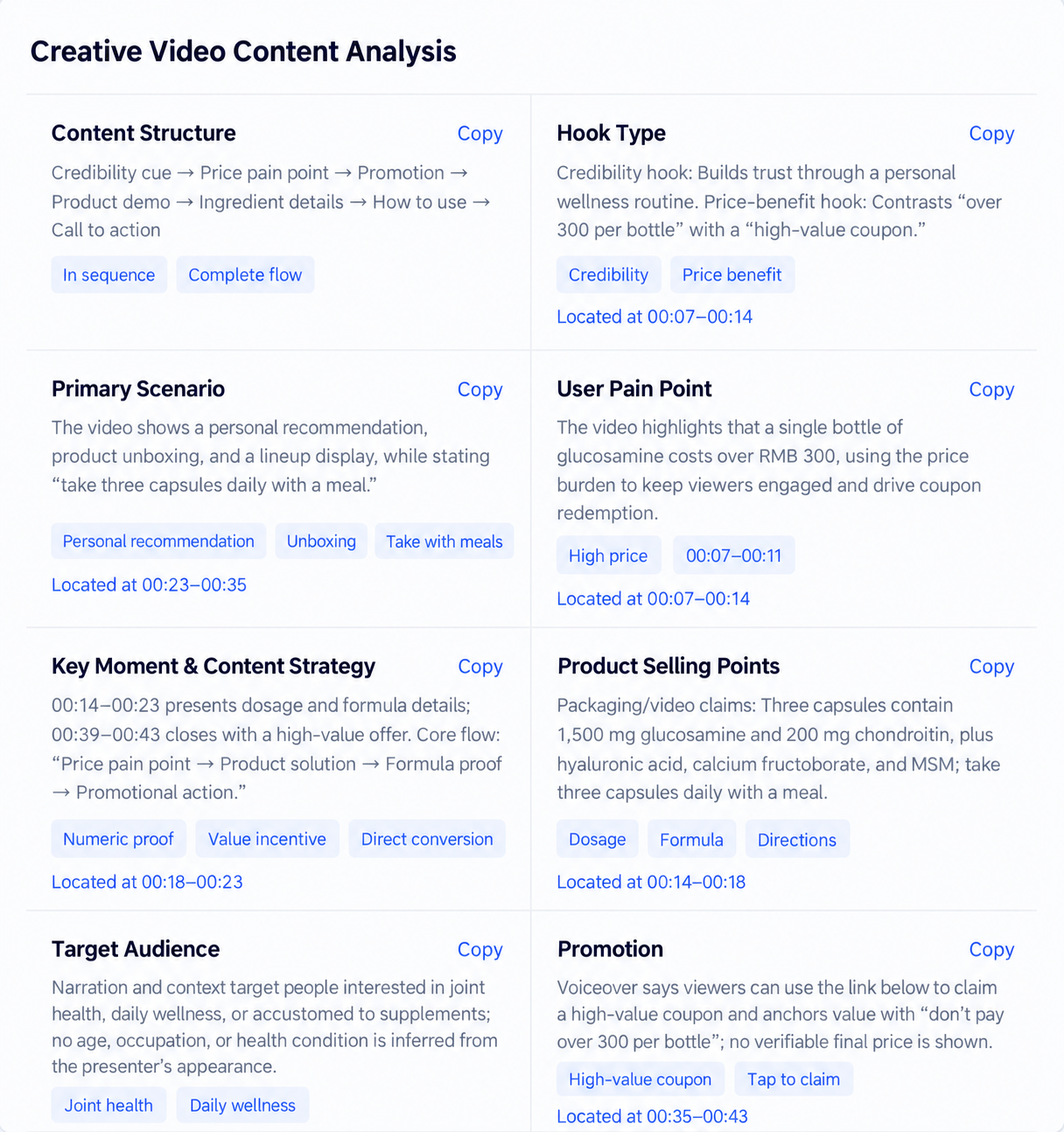
Hook
What appears or is said first: a problem, a product, a result, or an offer?
Use case
Which environment and audience need does the creative make visible?
Demonstration
What does the viewer learn from seeing the product in use?
Benefit
Which product attributes are translated into user-facing value?
Offer
Is a price, saving, bundle, deadline, or condition clearly presented?
CTA
What does the creative ask the viewer to do next?
Turn the evidence into a research brief—not a “winning product” claim
What the marketplace evidence supports
Document observed transactions, pricing, seller participation, and trend movement for the exact query and period.
What the advertising references suggest
Summarize recurring hooks, demonstrations, use cases, offers, and CTAs without treating them as performance proof.
What remains unproven
Supplier quality, landed cost, fees, policy risk, differentiation, campaign performance, and your own profitability still require separate validation.
eBay product research FAQ
Direct answers based on the current documented workflow and the limits of this combined research method.
Is eBay Product Research the same as Terapeak?
eBay Product Research is the current name for the tool previously known as Terapeak Product Research. eBay places it in the Research area of Seller Hub and also provides mobile access in supported versions of the eBay app.
Is eBay Product Research free?
eBay states that Product Research is free to sellers with access to Seller Hub. Sourcing Insights has separate eligibility and is available to qualifying business sellers with an eligible Store subscription.
What is the difference between Product Research and sold listings?
eBay says Product Research can cover up to three years, includes calculated research metrics, and can show the actual accepted price for Best Offer transactions. The standard completed-listings view covers a shorter recent period and may include related results.
How can advertising examples support product research?
Advertising examples can strengthen a product-research hypothesis by showing how similar products are actively presented and which hooks, demonstrations, benefits, offers, and CTAs recur. Treat these patterns as creative-market signals, then validate demand, margin, and likely performance with sales data, costs, and your own testing.